Materials
MultiMat defines materials over the cells in a mesh. This section describes how to use the MultiMat object to define materials.
Cell Material Relation
The distribution of materials over the mesh is determined using the Cell-Material Relation (CMR). If a mesh has N cells and M materials, each cell can have up to M possible values. This means the mesh will hold N*M values if each cell contains all materials. There are multiple ways to specify the CMR to MultiMat. A static material decomposition is described here, though the CMR can also be built dynamically. The easiest method for defining the CMR is to provide a bool vector containing true/false values for whether a cell/material combination is valid.
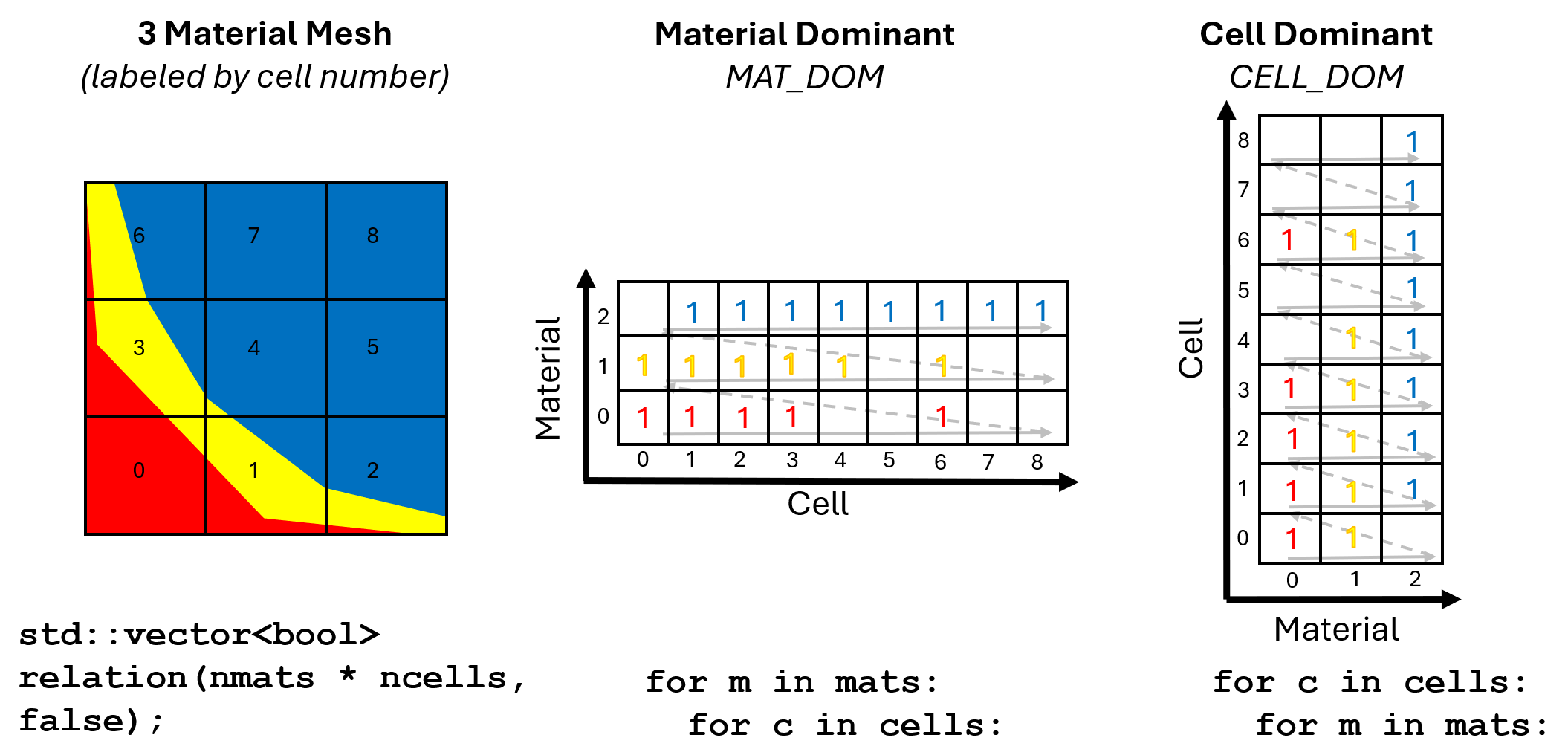
Fig. 32 Diagram showing mixed-material mesh with CELL_DOM and MAT_DOM ways of defining the Cell-Material Relation.
The following code shows how to initialize a MultiMat object with 9 cells and 3 materials
and build the CMR by populating a bool vector that is given to the MultiMat object.
In the following example, the relation is expressed using a Cell-Dominant
data layout (CELL_DOM). This means that the data will be arranged such that all material
values for cell 0 are given, followed by all of the material values for cell 1, until all
cells have provided their flags. The bool vector contains true if a material is present
in a cell and false if the material is not present. This CMR vector is essentially
a mask for which cell/material combinations are valid. Data can also be transposed
into a Material-Dominant data layout (MAT_DOM) in which the materials are
iterated first, followed by cells that use the current material.
  constexpr int nmats = 3;
  constexpr int ncells = 9;

  // Create the MultiMat object mm
  axom::multimat::MultiMat mm;
  mm.setNumberOfMaterials(nmats);
  mm.setNumberOfCells(ncells);

  // Cell-Dominant data layout
  int rel[ncells][nmats] = {
    {1,1,0},
    {1,1,1},
    {1,1,1},
    {1,1,1},
    {0,1,1},
    {0,0,1},
    {1,1,1},
    {0,0,1},
    {0,0,1}
  };
  std::vector<bool> relation(ncells * nmats, false);
  for(int c = 0; c < ncells; c++)
  {
    for(int m = 0; m < nmats; m++)
    {
      relation[c * nmats + m] = rel[c][m] > 0;
    }
  }
  mm.setCellMatRel(relation, axom::multimat::DataLayout::CELL_DOM);
Volume Fractions
The CMR determines which materials are present in each cell; volume fractions determine
how much material is in each cell. If a cell contains materials A and B
at 20% and 80%, respectively, then the volume fractions for those materials in the
cell are: 0.2 and 0.8. Note that the sum of volume fractions in a cell should equal 1
to account for all of the cell, though this is not enforced unless the isValid()
method is called. Volume fractions must be provided for every valid cell/material pair
in the CMR and they must be specified using the same data layout as data in the CMR.
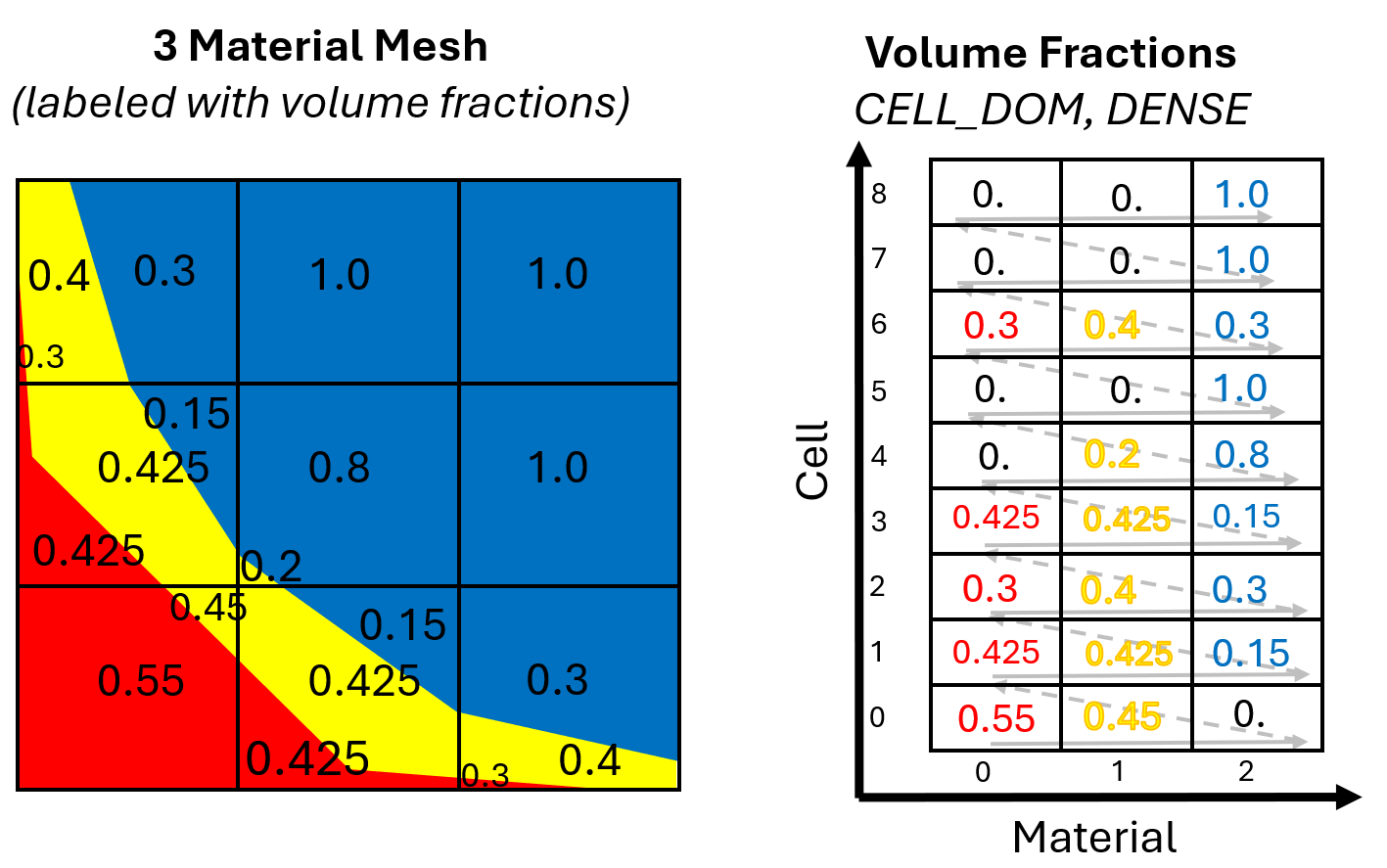
Fig. 33 Diagram showing mixed-material mesh with volume fractions shown in CELL_DOM table.
Volume fractions are stored in MultiMat as a field and fields have an added concept of sparsity. Fields can provide data for every possible cell/material pair; this is called a dense field. Dense fields are easy to understand: they have values for every cell/material pair, even for materials that are not actually present. Fields can also be sparse, saving memory by eliminating the zeroes where a material does not exist.
Volume fraction data are provided to MultiMat wrapped in an axom::ArrayView object,
which provides the default values for the volume fractions. The ArrayView is passed
to MultiMat using the setVolfracField() method. The following example shows how to
pass a dense volume fraction field to MultiMat. Note the zeroes where the material is
not present. After adding volume fractions, the MultiMat object is fully constructed
and it can be used to store field data.
  // Cell-Dominant, DENSE data layout
  double volfracs[ncells][nmats] = {
    {0.55,  0.45,  0.},
    {0.425, 0.425, 0.15},
    {0.3,   0.4,   0.3},
    {0.425, 0.425, 0.15},
    {0.,    0.2,   0.8},
    {0.,    0.,    1.},
    {0.3,   0.4,   0.3},
    {0.,    0.,    1.},
    {0.,    0.,    1.}
  };
  axom::ArrayView<double> vfView(&volfracs[0][0], ncells * nmats);
  mm.setVolfracField(vfView,
                     axom::multimat::DataLayout::CELL_DOM,
                     axom::multimat::SparsityLayout::DENSE);